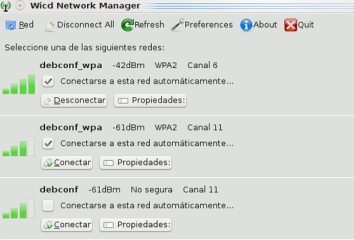


Wicd is an open source and free – wireless network manager for Linux based operating system e.g Ubuntu 10.04(Lucid Lynx).Wicd has simple and easy to use graphical user interface and a lot of options to configure your wireless network connectivity.Some of the best features of Wicd is –
- Full Featured graphical and console interface
- No graphical dependencies,that’s why it’s independent of Ubuntu desktop i.e wicd can be install in KDE(kubuntu),GNOME,XFCE..
- It can establish Wired(Ethernet only) and wireless network(s).
- Compatibility with Wireless tools.
- It displays a tray icon for network activity and signal strength.
- supports for many Encryption(WEP/WPA..) schemes.
Installing Wicd Network Manager on Ubuntu 10.04
Wicd can be installed on Ubuntu 10.04 ..in a number of ways – from Synaptic Package Manager ,ubuntu software Center or from Terminal.
install wicd on ubuntu from Synaptic Package Manager
#1. Open Synaptic Package Manager and search for “wicd”.
#2. Then mark the box(In the row which is related to wicd) and click ok to select dependencies(If asks).
#3. Then click on Apply in SPM to install wicd in ubuntu.Then wait until the installation is complete..
#4. That’s all …you have installed Wicd on your ubuntu 10.04 -Lucid Lynx successfully..
Installing Wicd using command Line/Terminal- Ubuntu 10.04
Type following command on terminal –
sudo apt-get install wicd
Using Wicd in Ubuntu 10.04(Lucid Lynx)
To open/configure Wicd ,go to Applications->Internet->Wicd.
WICD allows one connection (either wired or wireless) at a time on Ubuntu 10.04. Thats the only issue I found with it so far.
I don’t have a wireless or wired connection in Ubuntu Studio 10.10. I’ve started Synaptic with terminal and I have “all” and “wicd” in left pane but the right pane is blank.