

Ubuntu 11.10 (code named as ‘Oneiric Ocelot’ ) Alpha 3 released last week, with a lot of exciting and stunning improvements/changes. Ubuntu 11.10 final version will be released on Oct 13, 2011. The current stable version is 11.04 (Natty Narwhal).
Canonical has a done a lot of changes – a lot of new applications / packages has been added, while some has been removed; e.g synaptic has been dropped out in Ubuntu 10.10. Synaptic is one of the most stable and popular tool for installing/removing/managing packages in a many Linux distributions (including Ubuntu till current stable version). To be honest, most of the time I uses apt-get utility for installing new applications, but I do use Synaptic Package Manager some times (Few months before Synaptic was my most favorite tool for software installation). Anyway, a lot of Ubuntu users like Synaptic Package Manager and they found it more useful then Ubuntu Software Center (On which the canonical is focusing more).
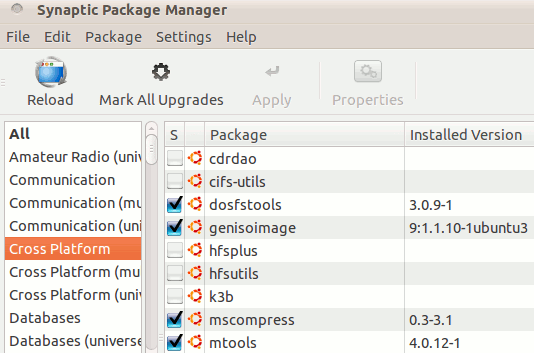
Synaptic Package Manager – One of the most popular tools in Ubuntu 10.10
Synaptic works as a front end of aptitude (which itself is a front end of Advanced Packaging Tool) so it does a lot of works in GUI mode –
- Installing New softwares/Apps
- Removing unused softwares
- Automatic package update
- add/remove package source etc.
So, synaptic is not installed by default in Ubuntu 11.10 but if you want to use it then just install it, in a few simple command, although it’s a different fact that –
” Due to the improvement in Ubuntu Software Center , nobody would probably need Synaptic, USC is sufficient for beginners while advanced users would go for apt-get “.
Installing Synaptic in Ubuntu 11.10 – from Command Line/Terminal
Open Terminal (Applications -Accessories ->Terminal or hit CTL+ALT+T) and type (Followed By your login password) :
sudo apt-get install synaptic
sudo apt-get install synaptic does not work in 11.10, afterinstallin synaptic screen dissappears immediately..
/usr/share/applications its in there
what you don’t understand !!! when he run synaptic…after 2 sec dissappear…hwo resolv that pls tell us…
It works on my computer
What to use instead synaptic pa. menager? Y PPA or something else?
I try sudo apt-get install synaptic and i get this:
Reading package lists… DoneBuilding dependency tree Reading state information… DonePackage synaptic is not available, but is referred to by another package.This may mean that the package is missing, has been obsoleted, oris only available from another sourceE: Package ‘synaptic’ has no installation candidate
que se passe t’il chez ubuntu ?? ils ne prennent pas conscience que l’utilisateur va partir ailleurs
d’ailleurs si çà continue je vais installer Mint à mes clients !!!!!!!!!!!!!!!!!!!
It would be great if you would write in English.
It would probably improve your future, as well as this blog!
Cheers.