

MySQL is the most popular database, mostly used in developing database driven websites or in other words web Applications (Web Apps or Apps). it’s Free and open source. MySQL is a Relational Database Management System (RDBMS), that runs like a server and serves the requests (usually CRUD (Create, Retrieve, Update, Delete) operations) from the clients.
On Ubuntu 11.04 (Alias : Natty Narwhal) , if you want to use any database server, then of course MySQL is the best choice. This post will guide you in installing MySQL server/client (current version : 5.1) from Synaptic Package Manager or Command Line. In last I’ll also show you, how to connect to the MySQL database at the Terminal/shell, although you can also install use graphical tool to manage MySQL database – e.g MySQL Query Browser, MySQL Administrator or phpMyAdmin. MySQL is very popular in the combination of : LAMP – Linux, Apache, MySQL and PHP.
Installing MySQL Server on Ubuntu 11.04
From Synaptic Package Manager
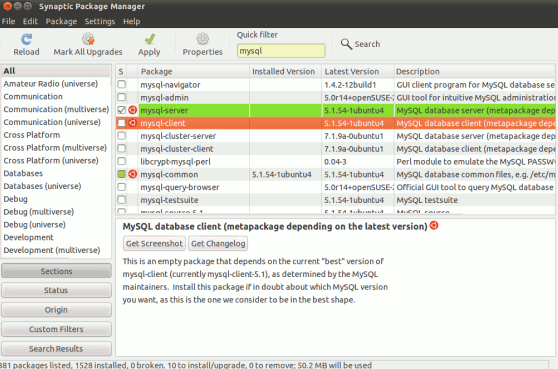
#1 : Open Synaptic Package Manager and search for ‘mysql’. Then select (check the box) the mysql server 5.1 to install. If you want to install some other packages, then click on yes, if it asks for dependencies.
#2 : Then click on Apply and wait for the installation to complete.
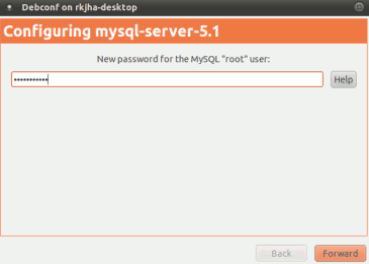
#3 : In the , middle of the installation you will be prompted to Enter the MySQL ROOT Password. Enter a good password for that, but remember!, you need this password to manage the MySQL databases and users, so don’t forget!!
#4 : Relax, until the installation is complete.
From Terminal
sudo apt-get install mysql-server
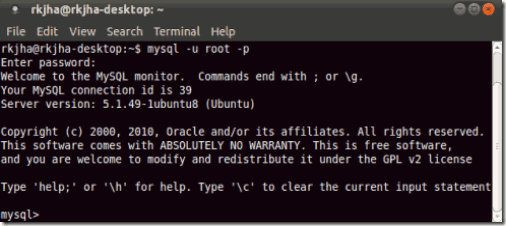
Now you can connect to MySQL server using the command (In the example the Server Address : localhost, Username : root) –
mysql -h localhost -u root -p
Then Enter your Password (ROOT Password, that you entered in step #3) to connect to the server running at localhost.
Thanks. This was an informative post. I am now able to install MySql. I am happy.
@ChuckDean, Welcome! and thanks for sharing your your feedback/experience ..I am also feeling happy after reading your comment..
nice informations and great articles. thanks for sharing. very appreciate … 🙂
Thank you very much!
Resolveu meu problema.
You are Welcome! ..Enjoy MySQL with Ubuntu!
Hi, i installed mysql-client, it does not ask any password while installing and when i try to run it fails. can you suggest what i need to do after installing it- my os is Natty-amd64.
when i install it through terminal it installed succeefully but it ask end user agreement after that nothing is happen can u suggest something
uncheck atumatic install
Thank You Very Much !!!!!
thanx, i install mysql using terminal. now it is working.
thanks a lot
During installation no configuration window pop up. I still can’t cnnect t mysql server
thank you rkjha! you save me! hahahah
thanks